This event has been ended!
Laser v praxi: rezanie & gravírovanie (večerný odborný kurz/lab)
Laser in practice: cutting and engraving (evening professional course/lab)
Event by: Kreatívne centrum Nitra
Location: 2920, Dobšinského, Nitra
Tickets: Get tickets
About event
Do you want to create something of your own, practical and original?
Do you want to understand how laser cutting and engraving work and learn how to prepare materials so that the result looks professional?
This course is for you, even if you have never tried it before.
In 5 sessions you will go through the entire process: from digital design → to laser preparation → to real cutting and engraving → and the finished product that you will take away home.
📆 make a reservation on April 14, 15, 22, 28 and 29 from 5:00 p.m. to 7:30 p.m.
☑️ the price for a 12.5-hour course is €115 (€9.20/hour) The course is sold as a whole.
☑️ CAPACITY - only 10 places
small group = individual approach, space for questions and the certainty that you will try everything practically.
WHAT WILL YOU LEARN?
👉basics of Adobe Illustrator
👉 you will learn to create clean, technically correct vector backgrounds for laser cutting and engraving.
Creation of your own product
👉 you will design your own object — from sketch to final digital design.
Preparation in LightBurn
👉you will find out how to properly set the colors, layers, power, speed and other parameters so that the laser cuts or engraves exactly according to your wishes.
👉lasing in practice
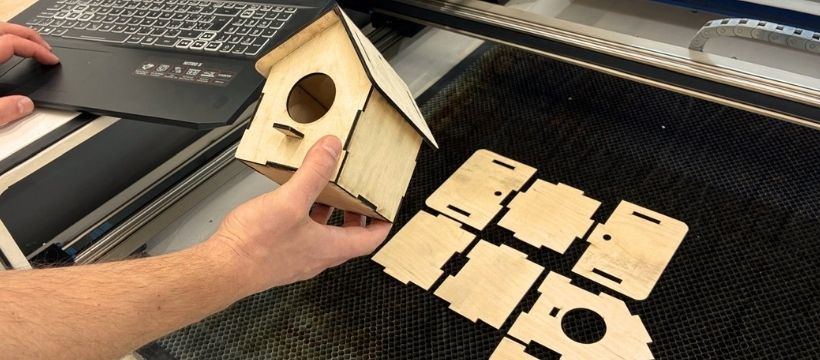
👉 you will start production, watch the process and take home the finished product that you created from scratch.
➡️ WHO IS THE COURSE/LAB FOR INTENDED?
for complete beginners, DIYers, students and everyone who wants to get to know laser cutting technology and use it to create practical and useful things,
previous experience is not necessary.
Lab structure and scope:
➡️1. part (3 days): Preparation of materials in Adobe Illustrator (Lecturer: Mgr. Marek Štěpánek)
• you will understand the basics of vector graphics – the difference between raster and vector, the principle of nodes and paths,
• you will work in Adobe Illustrator – you will learn to control the tools (Pen, Pathfinder, Shapes) and work in layers,
• you will learn the basics of vector graphics – the difference between raster and vector, the principle of nodes and ways,
• you will transfer your design from paper to digital form,
• you will learn how to prepare materials for the laser - you will understand the difference between an outline (cutting) and a surface (engraving) and how to set the parameters correctly so that the laser knows what to do.
➡️2. part (2 days): Preparation of materials in LightBurn and lasering (Lecturer: Mgr. Michal Poništ)
• you will learn to operate a CO₂ laser – you will understand how it works, how to work with it safely and what you need for basic maintenance,
• you will find out what materials are suitable for cutting and engraving – wood, plywood, plexiglass, leather, paper, glass, stone or some metals,
• you will prepare materials in LightBurn – you import data, set the power (Power), speed (Speed) and other parameters depending on whether you want to cut or engrave,
• try practical tasks – focus the beam, set the material, test it and start production itself,
• finish your product – learn simple final adjustments to make your product look clean and professional
WHO WILL BE YOU ACCOMPANY a course/lab?
👉 Michal Poništ – laser, engraving, technologies
• has many years of experience with CO₂ lasers from advertising production (stamps, stands, decorations, plexiglass covers...),
• knows laser technologies, 3D printing and CNC, so he can explain differences, limits and correct procedures,
• works with professional software (Fusion 360, Rhino, Adobe, Corel), so he can also advise on the technical preparation of data,
• lasering is his long-term practice and hobby, which can be felt in his approach and patience when learning.
• Michal is a person who will teach you how to operate the laser safely, set it up correctly and understand how it behaves with different materials.
He will explain everything practically and clearly.
👉 Marek Štěpánek – vector graphics, Illustrator, preparation of documents
• expert in Adobe Illustrator, Photoshop and InDesign with many years of experience in graphics,
• teaches graphic design at an art school, so he knows how to explain clearly, simply and patiently,
• runs a graphic studio where he prepares documents for various production technologies — that is, exactly what the participants need for the laser,
• he specializes in turning a hand drawing into a clean vector, which is a key skill for this course.
• Marek will teach you how to turn a hand sketch into a clean, technically correct vector that the laser can process without any problems. He is a person who can explain Illustrator even to a complete beginner
Come learn practical things under the guidance of experts in practice.
If you want to experience what it is like to design your own product and give it "life", join today.
Courses like this sell out fast. We only have 10 places.
Do you want to understand how laser cutting and engraving work and learn how to prepare materials so that the result looks professional?
This course is for you, even if you have never tried it before.
In 5 sessions you will go through the entire process: from digital design → to laser preparation → to real cutting and engraving → and the finished product that you will take away home.
📆 make a reservation on April 14, 15, 22, 28 and 29 from 5:00 p.m. to 7:30 p.m.
☑️ the price for a 12.5-hour course is €115 (€9.20/hour) The course is sold as a whole.
☑️ CAPACITY - only 10 places
small group = individual approach, space for questions and the certainty that you will try everything practically.
WHAT WILL YOU LEARN?
👉basics of Adobe Illustrator
👉 you will learn to create clean, technically correct vector backgrounds for laser cutting and engraving.
Creation of your own product
👉 you will design your own object — from sketch to final digital design.
Preparation in LightBurn
👉you will find out how to properly set the colors, layers, power, speed and other parameters so that the laser cuts or engraves exactly according to your wishes.
👉lasing in practice
👉 you will start production, watch the process and take home the finished product that you created from scratch.
➡️ WHO IS THE COURSE/LAB FOR INTENDED?
for complete beginners, DIYers, students and everyone who wants to get to know laser cutting technology and use it to create practical and useful things,
previous experience is not necessary.
Lab structure and scope:
➡️1. part (3 days): Preparation of materials in Adobe Illustrator (Lecturer: Mgr. Marek Štěpánek)
• you will understand the basics of vector graphics – the difference between raster and vector, the principle of nodes and paths,
• you will work in Adobe Illustrator – you will learn to control the tools (Pen, Pathfinder, Shapes) and work in layers,
• you will learn the basics of vector graphics – the difference between raster and vector, the principle of nodes and ways,
• you will transfer your design from paper to digital form,
• you will learn how to prepare materials for the laser - you will understand the difference between an outline (cutting) and a surface (engraving) and how to set the parameters correctly so that the laser knows what to do.
➡️2. part (2 days): Preparation of materials in LightBurn and lasering (Lecturer: Mgr. Michal Poništ)
• you will learn to operate a CO₂ laser – you will understand how it works, how to work with it safely and what you need for basic maintenance,
• you will find out what materials are suitable for cutting and engraving – wood, plywood, plexiglass, leather, paper, glass, stone or some metals,
• you will prepare materials in LightBurn – you import data, set the power (Power), speed (Speed) and other parameters depending on whether you want to cut or engrave,
• try practical tasks – focus the beam, set the material, test it and start production itself,
• finish your product – learn simple final adjustments to make your product look clean and professional
WHO WILL BE YOU ACCOMPANY a course/lab?
👉 Michal Poništ – laser, engraving, technologies
• has many years of experience with CO₂ lasers from advertising production (stamps, stands, decorations, plexiglass covers...),
• knows laser technologies, 3D printing and CNC, so he can explain differences, limits and correct procedures,
• works with professional software (Fusion 360, Rhino, Adobe, Corel), so he can also advise on the technical preparation of data,
• lasering is his long-term practice and hobby, which can be felt in his approach and patience when learning.
• Michal is a person who will teach you how to operate the laser safely, set it up correctly and understand how it behaves with different materials.
He will explain everything practically and clearly.
👉 Marek Štěpánek – vector graphics, Illustrator, preparation of documents
• expert in Adobe Illustrator, Photoshop and InDesign with many years of experience in graphics,
• teaches graphic design at an art school, so he knows how to explain clearly, simply and patiently,
• runs a graphic studio where he prepares documents for various production technologies — that is, exactly what the participants need for the laser,
• he specializes in turning a hand drawing into a clean vector, which is a key skill for this course.
• Marek will teach you how to turn a hand sketch into a clean, technically correct vector that the laser can process without any problems. He is a person who can explain Illustrator even to a complete beginner
Come learn practical things under the guidance of experts in practice.
If you want to experience what it is like to design your own product and give it "life", join today.
Courses like this sell out fast. We only have 10 places.